1. VR Headset Streaming Configuration
This section outlines the procedure to configure streaming from the VR headset to the computer
using SCRCPY.
1.1. Download and Installation
1. Download SCRCPY from the following link:
https://github.com/Genymobile/scrcpy/releases/download/v3.3.2/scrcpy-win64-v3.3.2.zip
2. Extract the contents of the archive to the Desktop.
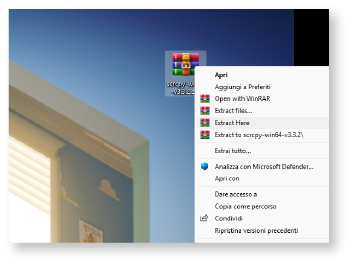 Figure 8: Zip Extraction
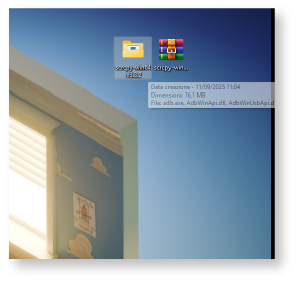 Figure 9: Extracted Folder
3. Open the extracted folder, right-click inside it, and select “Open in
Terminal”.
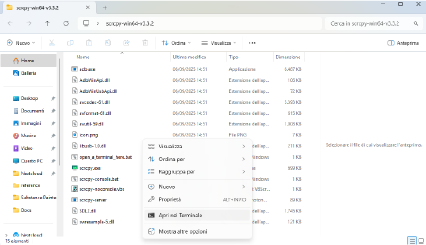
Figure 10: Opening Terminal
1.2. Streaming
1.2.1 Streaming via USB Cable
To start streaming via wired connection, run the following commands inside
the newly opened terminal:
1. Verify connected devices:
.\adb.exe devices
2. Start streaming:
.\scrcpy.exe
1.2.2. Streaming via WiFi
To configure and start wireless streaming, run the following commands inside the
newly opened terminal:
1. Verify connected devices:
.\adb.exe devices
2. Enable wireless mode on port 5555:
.\adb.exe tcpip 5555
3. Connect to the wireless device (replace <device_address> with the headset’s IP):
.\adb.exe connect <device_address>:5555
Example:
.\adb.exe connect 192.168.1.105:5555
4. Start wireless streaming:
.\scrcpy.exe –no-audio –video-buffer=30 –select-tcpip
1.2.3. Utility Commands
Disconnecting a wireless device:
To disconnect the device from the wireless connection:
\.\adb.exe disconnect <device_address>:5555
Example:
\.\adb.exe disconnect 192.168.1.105:5555
Forcefully terminate ADB:
In case of malfunctions or ADB bugs, use the following command to terminate the
server:
\.\adb.exe kill-server
Important Notes:
• Ensure that both the headset and the computer are connected to the same WiFi network before
proceeding with wireless streaming.
• In case of audio issues during streaming, use the –no-audio parameter with
the scrcpy command.
• If ADB experiences malfunctions, use the .\adb.exe kill-server command to
forcefully close the server before restarting it.